
GRANT ADMIN ACCESS TO A LINKEDIN PAGE
LinkedIn Page super admins can add, edit, or remove page and paid media admins through the Super Admin View or an email notification process. The instructions below detail the basic adding of a new admin. Additional instructions can be found directly within the LinkedIn help pages.
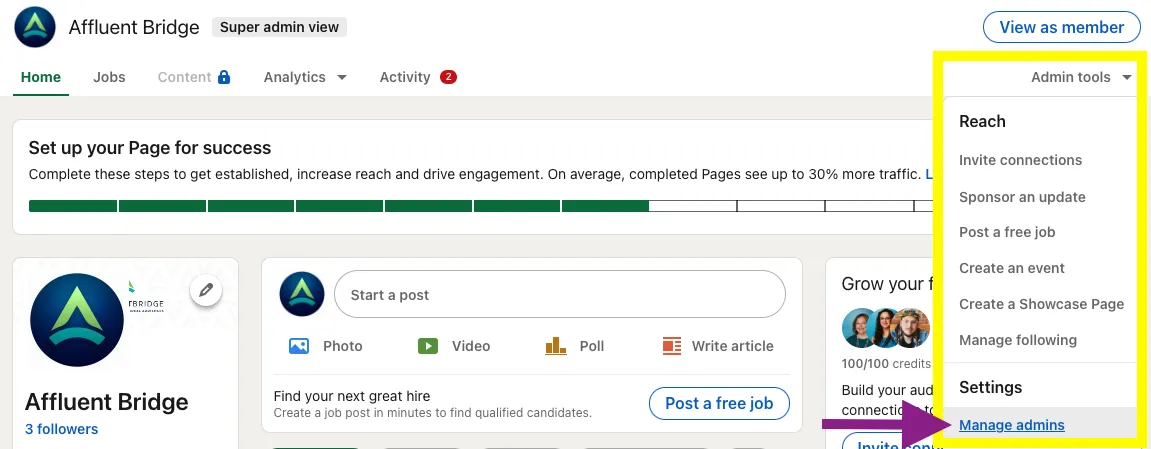
Log into your LinkedIn account and go to your business page Super admin view. Click the Admin Tools menu and choose Manage admins.
Under Admin Roles, click the Page admins tab, then click the + Add admin button.

Type the name of the AffluentBridge™ team member to add in the Search for a member… text field. You will need to have at least a 2nd-degree connection with the person you want to add. Click the member’s name from the menu that appears and choose the correct Admin role.
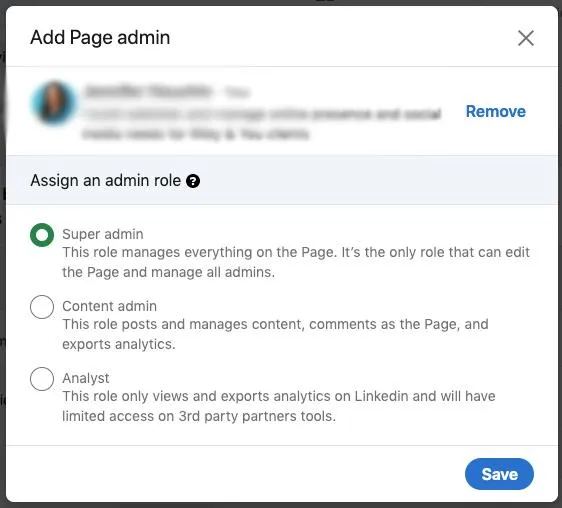
Click the Save button to finish.